 Tooter
 Tooter Phrase Coach for Chrome
Practice the phrases you find on the web.
A free Chrome extension. Select a phrase in another language, right-click, and hear it, say it and check it in a panel next to the page.
For Chrome 116 or later on Windows, Mac, Linux and Chromebooks.Chrome extensions work on a computer. Open this page there to add it.
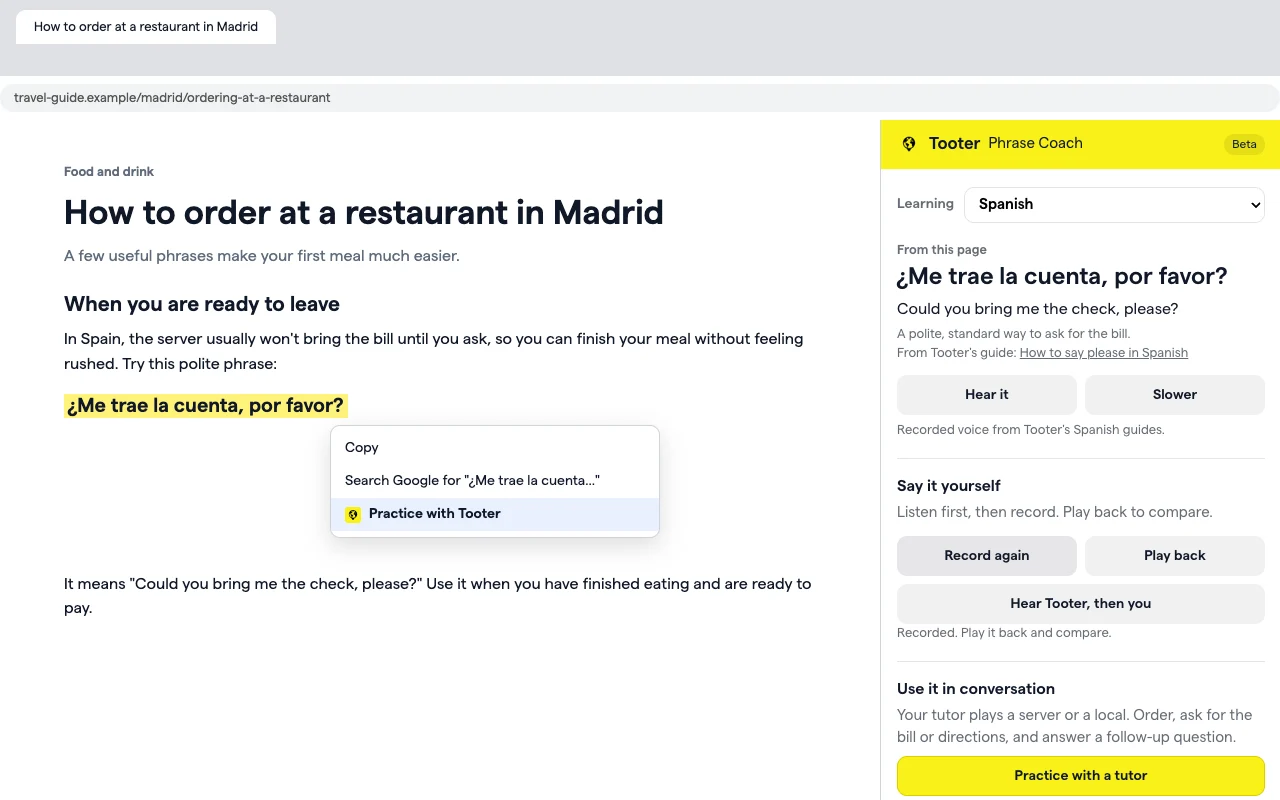
Three steps, without leaving the page.
- 1
Select a phrase
Highlight a word or sentence on any page: a travel guide, a recipe, a news story, a menu.
- 2
Right-click, Practice with Tooter
A side panel opens next to the page, so you keep your place in what you were reading.
- 3
Hear it, say it, check it
Listen at normal speed or slower, record yourself, and see which words came through.
Everything you need to say it right.
It only sees what you select.
- Phrase Coach can't read the pages you visit. It gets the text you select when you choose Practice with Tooter.
- Your recordings stay on your computer unless you press Check how I did, which sends that one recording to be transcribed and doesn't store it.
- When you play a phrase Tooter hasn't recorded, that text is sent to Tooter to be read aloud.
- Anonymous usage stats never include the text you select, and you can turn them off in the panel.
Questions
Is Phrase Coach free?
Yes. The extension is free to add and use. Spoken conversations with a Tooter tutor need a Tooter Pro membership; see pricing for the plans.
Which languages does it work with?
Spanish, French, German, Italian, Portuguese, Japanese, Chinese, Korean, Arabic and Russian. About 3,200 phrases have recordings from Tooter's language guides, and Tooter's voice reads anything else you select.
Do I need a Tooter account?
No. Hearing, recording, checking and saving phrases all work without one. Sign in from the bottom of the panel to keep your saved phrases on your Tooter account.
Can Phrase Coach read the pages I visit?
No. It only sees the text you select and choose to practice. It has no access to the rest of the page or your browsing history. Details are in our privacy policy.
Does it work on my phone?
No. Chrome extensions only run in Chrome on a computer: Windows, Mac, Linux or a Chromebook. On your phone, practice speaking in the Tooter app.
How is this different from the Tooter app?
Phrase Coach is for single phrases you find while reading. The Tooter app is where you hold whole spoken conversations with an AI tutor and work through guided lessons. Practice with a tutor in the panel takes a phrase from one to the other.